



Download Recipe Box – free digital cookbook, meal planner, and recipe manager
Overview
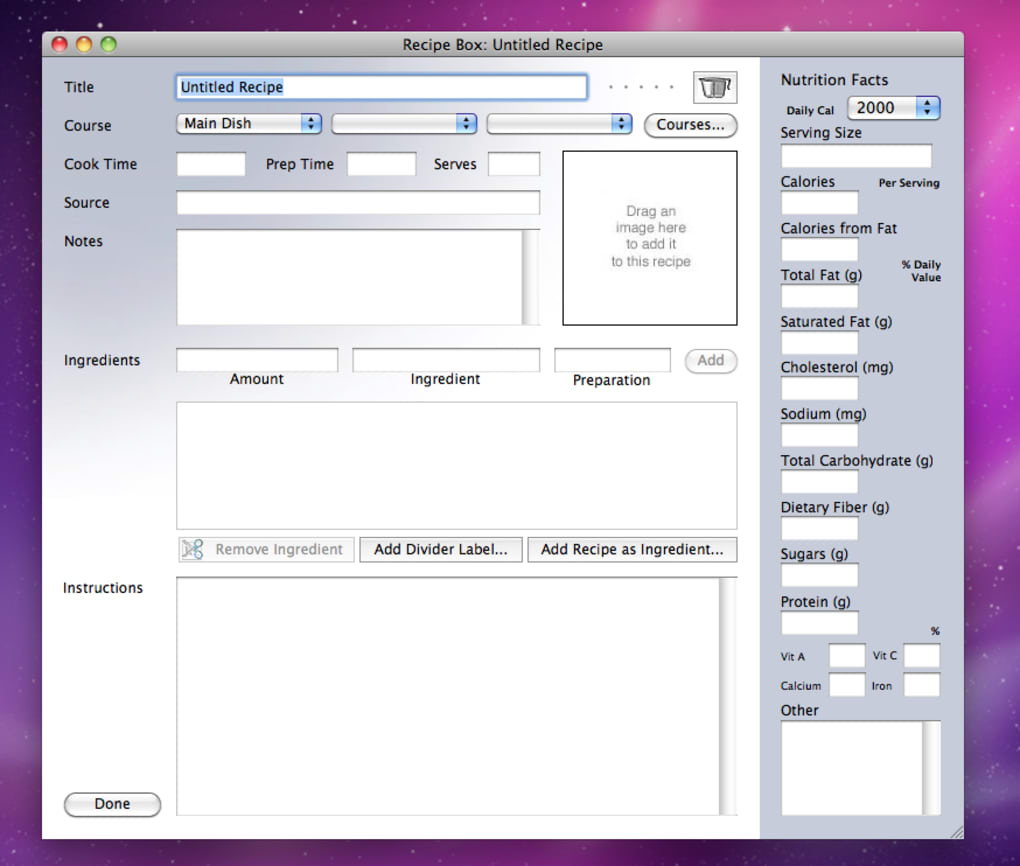
Recipe Box is a lightweight electronic recipe book designed for home cooks, professional chefs, and anyone who wants a tidy, searchable hub for culinary ideas. The program lets you create recipes from scratch, add ingredient lists, specify cooking times, and attach step‑by‑step instructions. A built‑in photo field means you can capture a snapshot of each finished dish, turning your digital library into a visual inspiration board.
Recipes can be grouped by course—appetizer, main, dessert, or any custom category you prefer—so browsing feels natural and fast. One of the most useful tools is the automatic shopping‑list generator, which pulls ingredients from selected recipes, consolidates quantities, and produces a printable list you can take to the store. The interface is deliberately streamlined: a left‑hand pane displays your recipe categories while the right side shows details for the currently selected dish.
Behind the simple layout, Recipe Box also offers hidden helpers such as ingredient‑measurement dictionaries and automatic conversion between fractions and decimals, ensuring consistency across all entries. While the core functions are free and secure, the app also supports optional updates that add new measurement units and seasonal ingredient suggestions. In short, Recipe Box transforms scattered handwritten notes, scattered browser tabs, and endless sticky notes into a single, searchable, printable cookbook that lives on your computer.
Key Features
- Unlimited Recipe Creation: Build as many recipes as you like, each with a title, ingredients, cooking time, and detailed instructions.
- Photo Attachments: Add a picture to every recipe for visual reference and a more appealing digital cookbook.
- Course Organization: Sort recipes by predefined courses (appetizer, main, side, dessert) or create custom categories.
- Shopping List Generator: Select multiple recipes and instantly produce a consolidated shopping list with quantities and measurement units.
- Print‑Ready Output: Export any recipe or shopping list to a printable format with one click.
- Ingredient & Measurement Dictionaries: Built‑in reference tables help you verify spelling, correct units, and standardize fractions or decimals.
- Automatic Scaling: Adjust ingredient quantities for different serving sizes; the program remembers your preferred fraction or decimal format.
- Secure Local Storage: All data is saved on your computer, giving you full control over privacy without cloud dependencies.
- Regular Free Updates: Receive bug fixes, new measurement units, and minor UI enhancements at no cost.
- Cross‑Platform Compatibility: Runs on Windows and macOS, with a mobile companion app for Android and iOS (optional).
Installation, Usage Instructions, and Compatibility
Step‑by‑Step Installation
Downloading and installing Recipe Box is straightforward. Visit the official website, click the “Download for Windows” or “Download for macOS” button, and save the installer file. Run the .exe (Windows) or .dmg (macOS) and follow the on‑screen prompts: accept the license agreement, choose an installation folder, and let the wizard complete the process.
The installer verifies file integrity, ensuring a secure, malware‑free setup. After installation, launch the application from the desktop shortcut or the start menu. The first launch displays a brief tutorial that walks you through creating your first recipe, adding a photo, and generating a shopping list.
Basic Usage Workflow
Once opened, the left panel lists all your courses. Click “Add New Recipe” to open a blank form. Fill in the recipe name, then type ingredients one per line, using the built‑in measurement dictionary to pick standardized units (e.g., “1 ½ cup flour”).
The program automatically converts fractions to dashes if you type a space, maintaining a clean numeric format. Under the instructions box, type each step; you can add bullet points, numbered lists, or even embed cooking timers. To attach a photo, click the image icon, browse to your picture file, and hit “Insert.” When you’re satisfied, click “Save.” The recipe now appears under its designated course, searchable via the top‑right search bar.
To create a shopping list, select multiple recipes by holding Ctrl (Windows) or Cmd (macOS) and clicking “Generate Shopping List.” The list opens in a new window where you can edit quantities before printing or exporting to PDF.
System Requirements and Operating Systems
Recipe Box runs on Windows 10, Windows 11, and macOS 10.15 (Catalina) or later. Minimum hardware requirements include a 1 GHz processor, 2 GB RAM, and 100 MB of free disk space. The optional mobile companion app is available for Android 8.0+ and iOS 13+. The desktop version does not require an internet connection for core functionality, although updates and optional cloud backup features need online access.
Pros, Cons, and Frequently Asked Questions
Pros
- Intuitive, clutter‑free interface makes recipe management painless.
- Free core version with regular security updates.
- Robust shopping‑list generator that consolidates ingredients across multiple recipes.
- Automatic handling of fractions and decimals reduces manual conversion errors.
- Local storage keeps your culinary data private.
Cons
- Editing an already generated shopping list can be cumbersome; you must recreate the list to apply changes.
- No built‑in cloud sync; manual backup is required for multi‑device access.
- Mobile companion app is a separate download and offers fewer features than the desktop version.
- Limited theme customization—users looking for dark mode must rely on OS‑level settings.
- Advanced nutritional analysis is not included in the free version.
FAQ
Can I import recipes from other apps or websites?
Recipe Box does not currently support direct import from external databases, but you can copy‑paste text into a new recipe manually. Future updates may add CSV or JSON import functionality.
Is my data encrypted or backed up automatically?
All recipes are stored locally in an encrypted SQLite file. Automatic cloud backup is not built‑in, so you should back up the file to an external drive or a cloud storage service of your choice.
Can I share a recipe with friends who don’t have Recipe Box?
Yes. Use the “Export as PDF” or “Print” options to create a shareable document that anyone can open, regardless of the software they use.
Does the program support metric and imperial measurements?
Both metric (grams, milliliters) and imperial (cups, ounces) units are included in the measurement dictionary. You can toggle the default system in the settings panel.
Is there a way to password‑protect my recipe collection?
The free version does not include password protection. A premium upgrade adds a master password feature that encrypts the entire recipe database.
Conclusion and Call to Action
Recipe Box delivers exactly what its name promises: a single, organized box for all of your culinary creations. Its clean UI, robust ingredient dictionaries, and handy shopping‑list generator make daily meal planning less stressful and more enjoyable. While the editing of shopping lists could be smoother and cloud sync is absent, those drawbacks are outweighed by the program’s security, zero‑cost entry point, and reliable performance on both Windows and macOS. Whether you are a busy parent juggling weeknight dinners or a professional chef cataloguing seasonal menus, Recipe Box offers a practical, secure way to keep every recipe at your fingertips.
Ready to streamline your kitchen workflow? Download Recipe Box now for free, start building your digital cookbook, and experience the convenience of having every recipe, photo, and shopping list in one secure location.







